
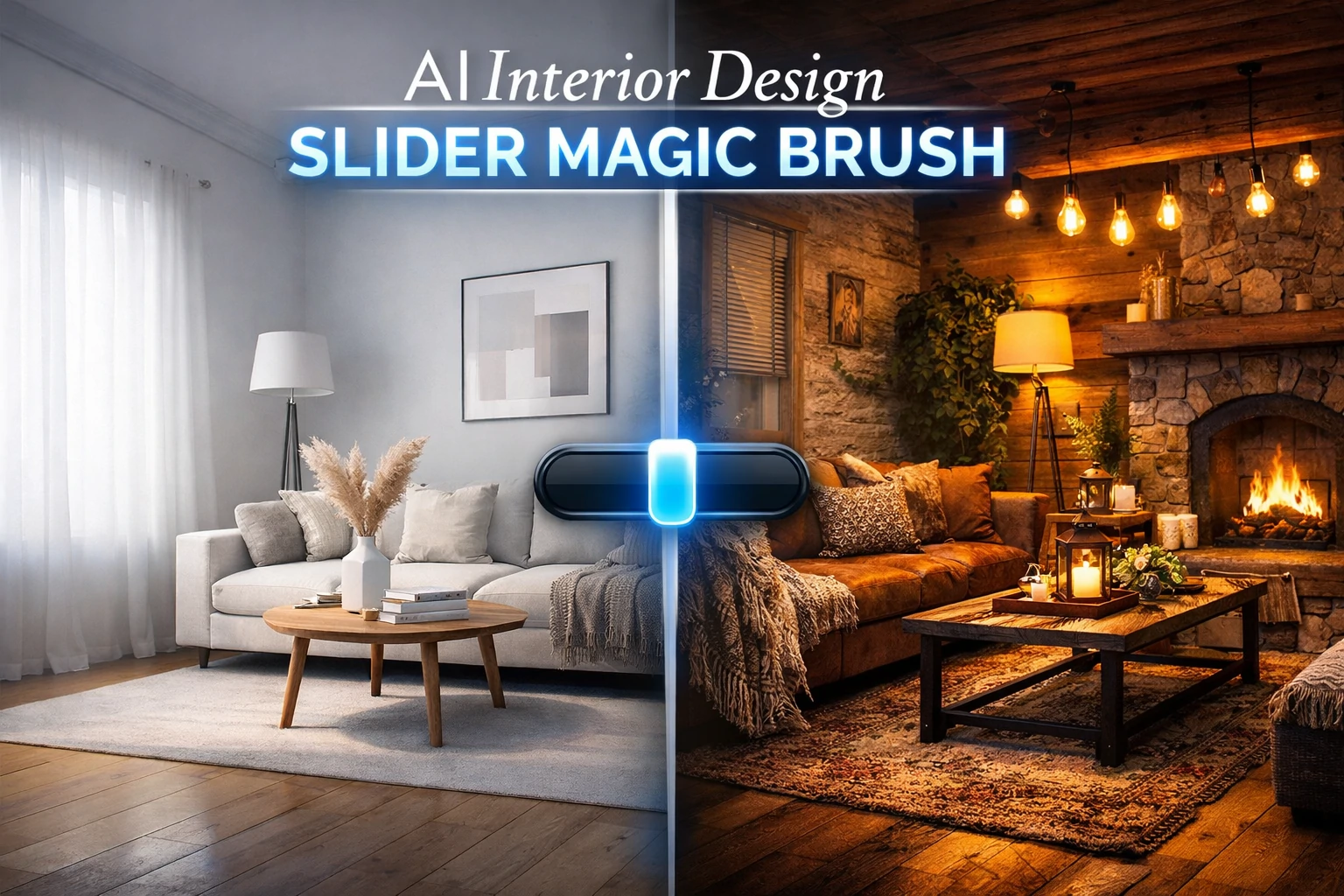
Interior design no longer needs long hours, costly experts, or hard-to-use software. People want rooms that look nice, feel calm, and match their taste. But most cannot picture how changes will look. They do not know if a new sofa fits. They worry about bold wall colors. They fear mistakes that cost time and money.
That is where the gap closes. AI now helps plan rooms with ease. One tool stands out. It is called the AI Interior Design Slider Magic Brush. This feature lets you change room styles with one swipe. It works fast. It feels smooth. It shows how your space could look in seconds.
It helps users plan smarter. It works for anyone. It replaces doubt with clear design ideas. Whether you rent, own, or stage homes, this tool makes design feel easy and fun.
What Is the Slider Magic Brush?
The Slider Magic Brush is a smart AI design tool. It helps people visualize room changes in real time. The tool lets users move a slider to change the room’s appearance. You can switch styles, colors, lighting, or furniture. The result updates on the screen as you move the slider. No guesswork. No waiting.
It feels like magic, but the logic is simple. AI maps the image. Then it applies new layers on top. Those layers match what you select—be it soft neutrals, sleek furniture, or warm lighting. With one swipe, the entire vibe shifts.
Some versions include preset styles. You can shift from “Minimalist” to “Vintage” with one motion. Others let you pick each detail. The tool fits homes, offices, and even small commercial spaces. And you do not need any design skill. Just a vision and a few taps.
How AI Understands Your Room
The tool uses trained AI models. These models learn from thousands of room layouts, color palettes, and furniture pieces. They also learn how light hits surfaces and how shapes interact in a space.
First, the tool scans your uploaded room image. Then it breaks the space into parts: floors, walls, furniture, windows. Next, the AI engine applies design changes based on your slider input. It updates the room in real time and keeps the visual balance correct.
The process includes:
- Scene recognition: It maps your space structure.
- Feature tagging: It finds designable elements like rugs or lamps.
- Style transformation: It adds selected themes without breaking proportions.
This process takes less than two seconds. That speed makes it fun to try new looks without delay.
Who Should Use It?
This tool is useful for many users. Here are some common ones:
Homeowners
They want to remodel or redecorate. But they fear choosing the wrong paint, layout, or product. This tool gives peace of mind. It shows them a room’s full potential before they spend money.
Renters
They want quick updates or light makeovers. But they need ideas that stay within limits. The slider tool helps them try changes like removable wallpaper, lighting tone, or open shelving—without breaking lease rules.
Interior Designers
Professionals use it to show clients real-time previews. They save hours of mockups and can test looks during meetings. It also helps clients pick faster.
Retail Shoppers
Some furniture stores add this tool to their apps. Buyers upload a photo of their room and use the slider to place new items virtually. This helps reduce returns and boosts confidence.
Architects and Real Estate Agents
They use it to stage homes digitally. A bare room can turn warm and modern in one swipe. That makes listings more attractive online.
Want to take your design interest further? Here’s a helpful guide on how to become an interior designer.
Features That Make the Tool Useful
This tool is not just smart—it is packed with helpful features. Let’s look at what makes it stand out.
Real-Time Room Rendering
The moment you move the slider, the room updates. You do not wait for uploads, approvals, or reloads. This makes the tool useful even during live client calls or online shopping sessions.
Wide Design Styles
Many versions offer 5–10 preset styles. These include modern, classic, coastal, farmhouse, and boho. You can see how the same room fits each mood.
Custom Color and Material Control
You can change wall paint, fabric textures, or tile styles. It shows how green velvet chairs or black cabinets would look without needing the actual items.
Smart Furniture Placement
Some tools allow layout changes. AI shifts the sofa or dining set to better spots. It respects proportions and walkways, so nothing looks out of place.
Lighting Simulation
It also adjusts lighting. You can move from natural daylight to warm evening tones. That helps judge how a room feels across the day.
Download and Share Options
Once done, users can save, download, or share the result. This helps teams work together and keeps records of favorite looks.
How It Improves Older Tools
Older design tools felt slow. Users needed to select, drag, place, and repeat. Each action took effort. You had to know the right layout. You had to resize furniture. You had to match color codes. Many people gave up before reaching a final look.
The Slider Magic Brush removes that work. You do not drag items or draw layouts. You move one slider. That slider updates everything—from wall paint to couch fabric. It feels fast. It feels fun. And it helps you see what you could not imagine before.
This freedom opens design to more people. It no longer belongs to those with training. Now, anyone can test a look, try a bold move, and undo it with no cost.
Popular Use Cases in Real Life
This tool now shows up in many spaces. It fits more than just tech lovers. Here are places where it adds value every day.
Interior Design Studios
Clients come with vague ideas. They say “I want something modern but cozy.” The slider shows both. Designers shift styles in seconds and get real-time feedback. This speeds up the design process and builds trust.
Online Furniture Stores
Retailers use it to cut returns. A buyer wonders if a green velvet chair fits their white room. They upload a photo. The tool adds the chair. They feel sure. The sale becomes final.
Apartment Rental Platforms
Many listings look empty. But this tool stages a bare room with a swipe. The renter sees how it could look. That makes the space feel more personal, which helps the deal close faster.
Smart Home Apps
Some home apps now add design features. Users change room settings and see instant effects. It links to home lighting, curtains, or music to match the new style mood.
Style Options That Work With the Tool
You may wonder what kind of looks the tool can create. It supports many themes. Below are common options users often try.
Minimalist
This style uses clean lines and few items. It often includes white or gray walls, natural wood, and low furniture. The slider shows how removing clutter changes space.
Modern
Modern styles often include sharp angles, metal frames, and glass tables. You can try bold wall paint or sleek black lighting with one swipe.
Rustic
Rustic rooms use wood beams, warm colors, and vintage textures. The tool adds aged leather sofas or deep-toned rugs in seconds.
Bohemian
This playful look adds patterns, plants, and bright colors. The slider turns a plain room into a cozy space full of charm.
Scandinavian
Scandi rooms mix white walls with soft light and pastel colors. The brush adds wool throws, light woods, and soft curves.
Some users also explore bold styles like Brutalist interior design when using this tool to test clean concrete, sharp lines, and neutral tones.
AI Strength vs Human Touch

Some wonder: can a slider really replace a designer?
It depends. The tool is great for fast ideas. It shows what might work. But it does not know your full story. A designer still adds value in deep ways. They listen. They plan for long-term needs. They spot safety risks.
Still, the slider can guide both client and designer. It makes talks faster. It builds visual trust. In many cases, it helps before the real work begins.
Think of it like this: the AI brush offers vision. The human turns that vision into real life.
Tips to Use the Slider Smarter
Using the tool is easy. But smart users get better results. Here are tips that help.
Upload Clear Photos
Use daylight. Take photos from a corner. This gives the AI a wide view. Avoid blurry images.
Start With One Style
Pick a look first. Maybe modern. Maybe rustic. Test the full slider range in that style. Then try others. Do not jump around too fast.
Take Screenshots
Save each version. Compare them side by side. Ask others what they like. You may spot small things that matter later.
Use It Early
Try the tool before you buy. Before you paint. Before you shop. This saves time and money.
Know Its Limits
It gives good ideas. But it cannot test furniture strength. Or smell how a scent candle might feel in the space. Use your senses too.
Design Trends The Tool Handles Well
The AI Slider Brush stays updated with trends. Here are a few it handles well.
Earthy Tones
Warm browns, deep greens, and stone grays. The slider shifts wall colors and accessories to match this theme.
Statement Lighting
Bold ceiling lamps or sculpted floor lights. You can see how they shape shadows in real time.
Mixed Textures
From leather to linen to marble, you test how materials play together. The tool applies these finishes with one move.
Open Shelving
The tool replaces closed cabinets with open ones. You see if the idea looks clean or messy in your room.
Ways to Add the Tool to Your Site
Some businesses want to offer this tool to their own users. Home decor sites, real estate pages, and design blogs all benefit from smart features. The Slider Magic Brush adds value to any platform that deals with space or style.
There are two main ways to add the tool:
Use an Existing Plugin or API
Some companies offer ready-made versions of the brush. You can add a code snippet to your site. That gives users instant access. You do not build anything from scratch.
This works best for WordPress, Shopify, or Wix websites. Most tools offer basic and pro plans. The free versions give style sliders with limited features. Paid versions unlock more themes, uploads, or branding control.
Build Your Own With AI Tools
If your site has a developer team, you can build a custom version. Use open-source models like Stable Diffusion or Google’s design APIs. Train them with your own data. Then wrap them in a slider front-end.
This gives you full control. You can match your brand look and target your users. It works best for companies with high traffic and tech skills.
Is the Tool Free or Paid?
It depends on the version. Many platforms offer free versions. They allow basic sliders, fixed styles, and low-resolution output. These work well for home users or small projects.
Paid versions cost between $10 to $50 per month. They add:
- High-quality previews
- Download and export options
- Custom branding for businesses
- Access to more design themes
Some tools charge per render. You buy a credit pack and use one credit per room. This model suits real estate or staging services that do not need the tool every day.
Always check the terms. Some free tools save your data or show ads. Paid tools often promise no ads and more privacy.
Comparison With Other AI Design Tools
The Slider Magic Brush is not the only AI tool in design. Many options exist. Each works in a different way. Let’s look at how it compares.
Versus Drag-and-Drop Planners
These tools let you place items in a virtual room. You drag a couch, rotate it, and try colors. This gives control. But it also takes time. You need to know layout rules.
The Slider Brush skips that. It updates the full room in one move. You get a full look without fine edits.
Versus 3D Render Apps
Some apps let you build 3D rooms. They use models, shadows, and textures. They look real. But they need powerful devices. And they take hours to render.
The Slider Brush works in 2D. It is fast. You do not wait for loads. You see changes live.
Versus AR Furniture Apps
Some phone apps place real products into live camera views. You hold your phone, and it shows a chair in your room. These apps are great for checking size.
But they do not change the whole room look. They do not shift wall colors or styles. The brush does.
Privacy and Data Safety
AI tools often need photos of your space. That raises privacy concerns. So users must ask: Is this safe?
Good tools follow these steps:
- They do not save your images unless you ask
- They use local render or encrypted cloud storage
- They delete data after a set time
- They do not train future models on user uploads
Before using any tool, check its privacy terms. Look for a clear data use policy. Avoid tools that ask for personal details without reason.
Some platforms offer offline desktop versions. These run the AI locally. No internet needed. These are the best for private users.
New Features on the Way
This tool will grow smarter over time. Developers are working on features that make design feel more natural and fast. One update may add voice control. You could speak a style, like “make this room coastal,” and the slider would adjust the space without touching the screen.
Cost previews may also appear. As you test new looks, the tool could show price estimates. This would help users plan better and avoid going over budget. It could guide real choices based on style and cost in one place.
Future versions may create mood boards automatically. The tool could suggest matching items like rugs, wall art, and color tones. These would fit your current style and give a full plan without outside help.
Shared sessions may also become real. Two people could design the same room at once, even from different places. They could change the layout, test colors, and review the results in real time.
These updates would make the AI slider tool feel more like a design partner. You would move from guessing to clear planning with smart help every step of the way.
Should You Try the Slider Tool?
The AI Interior Design Slider Magic Brush brings design into the hands of everyone. It works fast. It feels fun. It opens the door to styles people could not see before.
It saves time, cuts doubt, and brings joy to planning a home or office. It does not replace human touch. But it starts the journey. It sparks ideas. And it helps people feel more sure before they commit.
Design no longer lives only in showrooms or style books. It now fits in your pocket. In your screen. In one swipe.
If you want to refresh your space, this tool may be your best first step. Try it. Slide. Watch your space come to life.



Pingback: How Interior Design Affects Mental Health at Home | MintPalDecor
Pingback: Interior Design Trends 2026: What’s Changing at Home